Complexity and Big O Notation — Class 12 ISC Computer Science revision notes
A 3-page visual revision sheet for Complexity and Big O Notation, written for Class 12 ISC Computer Science. Formulas, diagrams and the traps that cost marks, laid out to be read the night before rather than the term before. Free, and it opens inside CapCompass.
 Page 1 as PDF
Complexity and Big O Notation in one look
how the number of steps an algorithm takes grows as the input grows
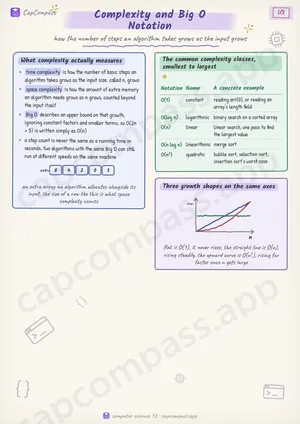
What complexity actually measures
- time complexity is how the number of basic steps an algorithm takes grows as the input size, called n, grows
- space complexity is how the amount of extra memory an algorithm needs grows as n grows, counted beyond the input itself
- Big O describes an upper bound on that growth, ignoring constant factors and smaller terms, so O(2n + 5) is written simply as O(n)
- a step count is never the same as a running time in seconds, two algorithms with the same Big O can still run at different speeds on the same machine
The common complexity classes, smallest to largest
| Notation | Name | A concrete example |
|---|---|---|
| O(1) | constant | reading arr[0], or reading an array's length field |
| O(log n) | logarithmic | binary search on a sorted array |
| O(n) | linear | linear search, one pass to find the largest value |
| O(n log n) | linearithmic | merge sort |
| O(n^2) | quadratic | bubble sort, selection sort, insertion sort's worst case |
Page 1 of 3. The full sheet, all 3 pages, opens free in the app.
What this Complexity and Big O Notation sheet covers
- What complexity actually measures
- The common complexity classes, smallest to largest
- Three growth shapes on the same axes
- Estimating a single loop
- Estimating two nested loops
- Matching an operation to its class
- Array index access
- Binary search
- Linear search
- Merge sort
- Bubble sort
- Insertion sort, worst case
- Best case, worst case, average case
- Traps that cost marks
- Tricks that save time
How CapCompass uses this sheet
These notes are not a standalone PDF. CapCompass plans Computer Science chapter by chapter against your real exam dates and free hours, and when the plan reaches Complexity and Big O Notation the sheet opens inside the study block itself — at the page covering the sub-topic that block is on, with the timer still running. Revision arrives at the moment the plan says revise, instead of having to be gone looking for.