Database Concepts and SQL — Class 12 CBSE Computer Science revision notes
A 3-page visual revision sheet for Database Concepts and SQL, written for Class 12 CBSE Computer Science. Formulas, diagrams and the traps that cost marks, laid out to be read the night before rather than the term before. Free, and it opens inside CapCompass.
 Page 1 as PDF
Database Concepts and SQL in one look
a table is rows and columns, a query is how you ask it a question
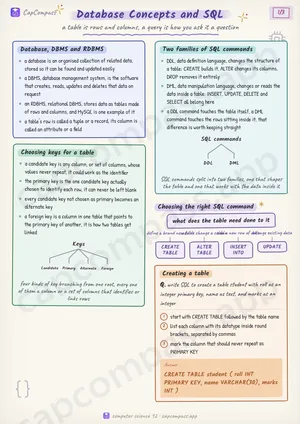
Database, DBMS and RDBMS
- a database is an organised collection of related data, stored so it can be found and updated easily
- a DBMS, database management system, is the software that creates, reads, updates and deletes that data on request
- an RDBMS, relational DBMS, stores data as tables made of rows and columns, and MySQL is one example of it
- a table's row is called a tuple or a record, its column is called an attribute or a field
Choosing keys for a table
- a candidate key is any column, or set of columns, whose values never repeat, it could work as the identifier
- the primary key is the one candidate key actually chosen to identify each row, it can never be left blank
- every candidate key not chosen as primary becomes an alternate key
- a foreign key is a column in one table that points to the primary key of another, it is how two tables get linked
Two families of SQL commands
- DDL, data definition language, changes the structure of a table: CREATE builds it, ALTER changes its columns, DROP removes it entirely
- DML, data manipulation language, changes or reads the data inside a table: INSERT, UPDATE, DELETE and SELECT all belong here
- a DDL command touches the table itself, a DML command touches the rows sitting inside it, that difference is worth keeping straight
Choosing the right SQL command
what does the table need done to it
- define a brand new table — CREATE TABLE
- add or change a column — ALTER TABLE
- add a new row of data — INSERT INTO
- change existing data — UPDATE
Creating a table
Q. write SQL to create a table student with roll as an integer primary key, name as text, and marks as an integer
- start with CREATE TABLE followed by the table name
- list each column with its datatype inside round brackets, separated by commas
- mark the column that should never repeat as PRIMARY KEY
Answer: CREATE TABLE student ( roll INT PRIMARY KEY, name VARCHAR(30), marks INT )
Page 1 of 3. The full sheet, all 3 pages, opens free in the app.
What this Database Concepts and SQL sheet covers
- Database, DBMS and RDBMS
- Choosing keys for a table
- Two families of SQL commands
- Choosing the right SQL command
- Creating a table
- Inserting, updating and deleting rows
- SELECT with WHERE and ORDER BY
- The order a SELECT is written in
- The aggregate functions
- GROUP BY with an aggregate function
- Traps that cost marks
- Tricks that save time
How CapCompass uses this sheet
These notes are not a standalone PDF. CapCompass plans Computer Science chapter by chapter against your real exam dates and free hours, and when the plan reaches Database Concepts and SQL the sheet opens inside the study block itself — at the page covering the sub-topic that block is on, with the timer still running. Revision arrives at the moment the plan says revise, instead of having to be gone looking for.