Functions and Scope — Class 12 CBSE Computer Science revision notes
A 3-page visual revision sheet for Functions and Scope, written for Class 12 CBSE Computer Science. Formulas, diagrams and the traps that cost marks, laid out to be read the night before rather than the term before. Free, and it opens inside CapCompass.
 Page 1 as PDF
Functions and Scope in one look
a function packs up a job, scope decides which names it can see while it works
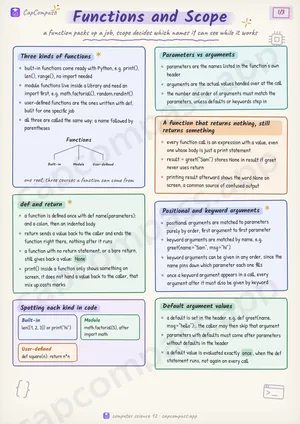
Three kinds of functions
- built-in functions come ready with Python, e.g. print(), len(), range(), no import needed
- module functions live inside a library and need an import first, e.g. math.factorial(), random.randint()
- user-defined functions are the ones written with def, built for one specific job
- all three are called the same way: a name followed by parentheses
def and return
- a function is defined once with def name(parameters): and a colon, then an indented body
- return sends a value back to the caller and ends the function right there, nothing after it runs
- a function with no return statement, or a bare return, still gives back a value: None
- print() inside a function only shows something on screen, it does not hand a value back to the caller, that mix up costs marks
Spotting each kind in code
- Built-in: len([1, 2, 3]) or print("hi")
- Module: math.factorial(5), after import math
- User-defined: def square(n): return n*n
Parameters vs arguments
- parameters are the names listed in the function's own header
- arguments are the actual values handed over at the call
- the number and order of arguments must match the parameters, unless defaults or keywords step in
A function that returns nothing, still returns something
- every function call is an expression with a value, even one whose body is just a print statement
- result = greet("Sam") stores None in result if greet never uses return
- printing result afterward shows the word None on screen, a common source of confused output
Positional and keyword arguments
- positional arguments are matched to parameters purely by order, first argument to first parameter
- keyword arguments are matched by name, e.g. greet(name="Sam", msg="hi")
- keyword arguments can be given in any order, since the name pins down which parameter each one fills
- once a keyword argument appears in a call, every argument after it must also be given by keyword
Default argument values
- a default is set in the header, e.g. def greet(name, msg="hello"):, the caller may then skip that argument
- parameters with defaults must come after parameters without defaults in the header
- a default value is evaluated exactly once, when the def statement runs, not again on every call
Page 1 of 3. The full sheet, all 3 pages, opens free in the app.
What this Functions and Scope sheet covers
- Three kinds of functions
- def and return
- Spotting each kind in code
- Built-in
- Module
- User-defined
- Parameters vs arguments
- A function that returns nothing, still returns something
- Positional and keyword arguments
- Default argument values
- The mutable default argument
- Tracing three calls to greet
- Positional vs Keyword vs Default
- Positional
- Keyword
- Default
- LEGB, where a name is found
- Local
- Enclosing
- Global
- Local vs global scope
- The global keyword
- Passing a mutable list into a function
- Traps that cost marks
- Tricks that save time
How CapCompass uses this sheet
These notes are not a standalone PDF. CapCompass plans Computer Science chapter by chapter against your real exam dates and free hours, and when the plan reaches Functions and Scope the sheet opens inside the study block itself — at the page covering the sub-topic that block is on, with the timer still running. Revision arrives at the moment the plan says revise, instead of having to be gone looking for.