File Handling — Class 12 CBSE Computer Science revision notes
A 3-page visual revision sheet for File Handling, written for Class 12 CBSE Computer Science. Formulas, diagrams and the traps that cost marks, laid out to be read the night before rather than the term before. Free, and it opens inside CapCompass.
 Page 1 as PDF
File Handling in one look
the mode you open with decides everything that happens next
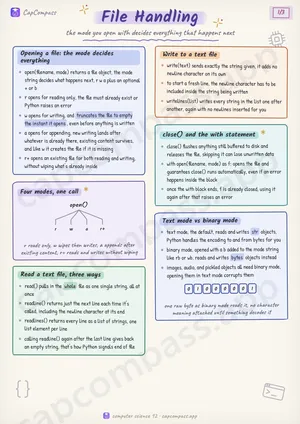
Opening a file: the mode decides everything
- open(filename, mode) returns a file object, the mode string decides what happens next, r w a plus an optional + or b
- r opens for reading only, the file must already exist or Python raises an error
- w opens for writing, and truncates the file to empty the instant it opens, even before anything is written
- a opens for appending, new writing lands after whatever is already there, existing content survives, and like w it creates the file if it is missing
- r+ opens an existing file for both reading and writing, without wiping what's already inside
Read a text file, three ways
- read() pulls in the whole file as one single string, all at once
- readline() returns just the next line each time it's called, including the newline character at its end
- readlines() returns every line as a list of strings, one list element per line
- calling readline() again after the last line gives back an empty string, that's how Python signals end of file
Write to a text file
- write(text) sends exactly the string given, it adds no newline character on its own
- to start a fresh line, the newline character has to be included inside the string being written
- writelines(list) writes every string in the list one after another, again with no newlines inserted for you
close() and the with statement
- close() flushes anything still buffered to disk and releases the file, skipping it can lose unwritten data
- with open(filename, mode) as f: opens the file and guarantees close() runs automatically, even if an error happens inside the block
- once the with block ends, f is already closed, using it again after that raises an error
Text mode vs binary mode
- text mode, the default, reads and writes str objects, Python handles the encoding to and from bytes for you
- binary mode, opened with a b added to the mode string like rb or wb, reads and writes bytes objects instead
- images, audio, and pickled objects all need binary mode, opening them in text mode corrupts them
Page 1 of 3. The full sheet, all 3 pages, opens free in the app.
What this File Handling sheet covers
- Opening a file: the mode decides everything
- Four modes, one call
- Read a text file, three ways
- Write to a text file
- close() and the with statement
- Text mode vs binary mode
- pickle: saving a Python object as it is
- Text file vs Binary file
- Text file
- Binary file
- Moving the file pointer: seek and tell
- pickle in two calls
- dump
- load
- The csv module: reading rows
- The csv module: writing rows
- Absolute vs Relative path
- Absolute
- Relative
- Traps that cost marks
- Tricks that save time
How CapCompass uses this sheet
These notes are not a standalone PDF. CapCompass plans Computer Science chapter by chapter against your real exam dates and free hours, and when the plan reaches File Handling the sheet opens inside the study block itself — at the page covering the sub-topic that block is on, with the timer still running. Revision arrives at the moment the plan says revise, instead of having to be gone looking for.