Functions — Class 11 CBSE Computer Science revision notes
A 3-page visual revision sheet for Functions, written for Class 11 CBSE Computer Science. Formulas, diagrams and the traps that cost marks, laid out to be read the night before rather than the term before. Free, and it opens inside CapCompass.
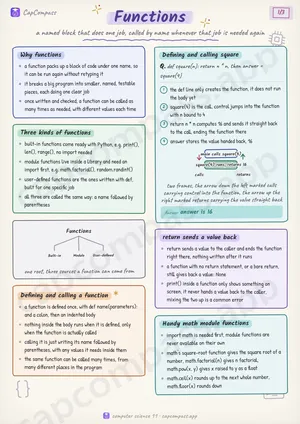 Page 1 as PDF
Functions in one look
a named block that does one job, called by name whenever that job is needed again
Why functions
- a function packs up a block of code under one name, so it can be run again without retyping it
- it breaks a big program into smaller, named, testable pieces, each doing one clear job
- once written and checked, a function can be called as many times as needed, with different values each time
Three kinds of functions
- built-in functions come ready with Python, e.g. print(), len(), range(), no import needed
- module functions live inside a library and need an import first, e.g. math.factorial(), random.randint()
- user-defined functions are the ones written with def, built for one specific job
- all three are called the same way: a name followed by parentheses
Defining and calling a function
- a function is defined once, with def name(parameters): and a colon, then an indented body
- nothing inside the body runs when it is defined, only when the function is actually called
- calling it is just writing its name followed by parentheses, with any values it needs inside them
- the same function can be called many times, from many different places in the program
Defining and calling square
Q. def square(n): return n * n, then answer = square(4)
- the def line only creates the function, it does not run the body yet
- square(4) is the call, control jumps into the function with n bound to 4
- return n * n computes 16 and sends it straight back to the call, ending the function there
- answer stores the value handed back, 16
Answer: answer is 16
return sends a value back
- return sends a value to the caller and ends the function right there, nothing written after it runs
- a function with no return statement, or a bare return, still gives back a value: None
- print() inside a function only shows something on screen, it never hands a value back to the caller, mixing the two up is a common error
Handy math module functions
- import math is needed first, module functions are never available on their own
- math's square-root function gives the square root of a number, math.factorial(n) gives n factorial, math.pow(x, y) gives x raised to y as a float
- math.ceil(x) rounds up to the next whole number, math.floor(x) rounds down
Page 1 of 3. The full sheet, all 3 pages, opens free in the app.
What this Functions sheet covers
- Why functions
- Three kinds of functions
- Defining and calling a function
- Defining and calling square
- return sends a value back
- Handy math module functions
- Parameters vs arguments
- Default argument values
- Positional vs Keyword vs Default
- Positional
- Keyword
- Default
- Handy random module functions
- math module vs random module
- math
- random
- Every call is an expression
- Terms that show up as one-liners
- Traps that cost marks
- Tricks that save time
How CapCompass uses this sheet
These notes are not a standalone PDF. CapCompass plans Computer Science chapter by chapter against your real exam dates and free hours, and when the plan reaches Functions the sheet opens inside the study block itself — at the page covering the sub-topic that block is on, with the timer still running. Revision arrives at the moment the plan says revise, instead of having to be gone looking for.