Strings — Class 11 CBSE Computer Science revision notes
A 4-page visual revision sheet for Strings, written for Class 11 CBSE Computer Science. Formulas, diagrams and the traps that cost marks, laid out to be read the night before rather than the term before. Free, and it opens inside CapCompass.
 Page 1 as PDF
Strings in one look
text as a sequence of characters, indexed, sliced, and never changed in place
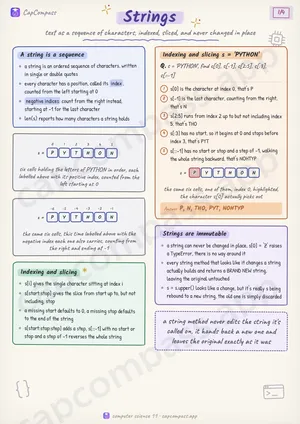
A string is a sequence
- a string is an ordered sequence of characters, written in single or double quotes
- every character has a position, called its index, counted from the left starting at 0
- negative indices count from the right instead, starting at -1 for the last character
- len(s) reports how many characters a string holds
Indexing and slicing
- s[i] gives the single character sitting at index i
- s[start:stop] gives the slice from start up to, but not including, stop
- a missing start defaults to 0, a missing stop defaults to the end of the string
- s[start:stop:step] adds a step, s[::-1] with no start or stop and a step of -1 reverses the whole string
Indexing and slicing s = 'PYTHON'
Q. s = 'PYTHON', find s[0], s[-1], s[2:5], s[:3], s[::-1]
- s[0] is the character at index 0, that's P
- s[-1] is the last character, counting from the right, that's N
- s[2:5] runs from index 2 up to but not including index 5, that's THO
- s[:3] has no start, so it begins at 0 and stops before index 3, that's PYT
- s[::-1] has no start or stop and a step of -1, walking the whole string backward, that's NOHTYP
Answer: P, N, THO, PYT, NOHTYP
Strings are immutable
- a string can never be changed in place, s[0] = 'Z' raises a TypeError, there is no way around it
- every string method that looks like it changes a string actually builds and returns a BRAND NEW string, leaving the original untouched
- s = s.upper() looks like a change, but it's really s being rebound to a new string, the old one is simply discarded
Page 1 of 4. The full sheet, all 4 pages, opens free in the app.
What this Strings sheet covers
- A string is a sequence
- Indexing and slicing
- Indexing and slicing s = 'PYTHON'
- Strings are immutable
- Common string methods
- split() and join(), two halves of the same idea
- split and join, worked
- 'a,b,c'.split(',')
- '-'.join(['a', 'b', 'c'])
- ' hi '.strip()
- 'cat'.find('t')
- 'cat'.find('z')
- String operators
- Traversing a string
- format() and f-strings
- Terms that show up as one-liners
- Traps that cost marks
- Tricks that save time
How CapCompass uses this sheet
These notes are not a standalone PDF. CapCompass plans Computer Science chapter by chapter against your real exam dates and free hours, and when the plan reaches Strings the sheet opens inside the study block itself — at the page covering the sub-topic that block is on, with the timer still running. Revision arrives at the moment the plan says revise, instead of having to be gone looking for.