Lists and Tuples — Class 11 CBSE Computer Science revision notes
A 3-page visual revision sheet for Lists and Tuples, written for Class 11 CBSE Computer Science. Formulas, diagrams and the traps that cost marks, laid out to be read the night before rather than the term before. Free, and it opens inside CapCompass.
 Page 1 as PDF
Lists and Tuples in one look
two ways to hold many values in one name, one of them changeable and one of them not
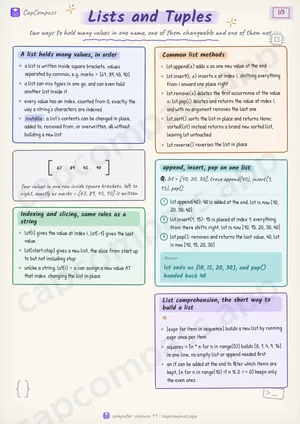
A list holds many values, in order
- a list is written inside square brackets, values separated by commas, e.g. marks = [67, 89, 45, 90]
- a list can mix types in one go, and can even hold another list inside it
- every value has an index, counted from 0, exactly the way a string's characters are indexed
- mutable: a list's contents can be changed in place, added to, removed from, or overwritten, all without building a new list
Indexing and slicing, same rules as a string
- lst[i] gives the value at index i, lst[-1] gives the last value
- lst[start:stop] gives a new list, the slice from start up to but not including stop
- unlike a string, lst[i] = x can assign a new value AT that index, changing the list in place
Common list methods
- lst.append(x) adds x as one new value at the end
- lst.insert(i, x) inserts x at index i, shifting everything from i onward one place right
- lst.remove(x) deletes the first occurrence of the value x; lst.pop(i) deletes and returns the value at index i, and with no argument removes the last one
- lst.sort() sorts the list in place and returns None; sorted(lst) instead returns a brand new sorted list, leaving lst untouched
- lst.reverse() reverses the list in place
append, insert, pop on one list
Q. lst = [10, 20, 30], trace append(40), insert(1, 15), pop()
- lst.append(40): 40 is added at the end, lst is now [10, 20, 30, 40]
- lst.insert(1, 15): 15 is placed at index 1, everything from there shifts right, lst is now [10, 15, 20, 30, 40]
- lst.pop(): removes and returns the last value, 40, lst is now [10, 15, 20, 30]
Answer: lst ends as [10, 15, 20, 30], and pop() handed back 40
List comprehension, the short way to build a list
- [expr for item in sequence] builds a new list by running expr once per item
- squares = [n * n for n in range(5)] builds [0, 1, 4, 9, 16] in one line, no empty list or append needed first
- an if can be added at the end to filter which items are kept, [n for n in range(10) if n % 2 == 0] keeps only the even ones
Page 1 of 3. The full sheet, all 3 pages, opens free in the app.
What this Lists and Tuples sheet covers
- A list holds many values, in order
- Indexing and slicing, same rules as a string
- Common list methods
- append, insert, pop on one list
- List comprehension, the short way to build a list
- A tuple holds many values too, but frozen
- Packing and unpacking
- List vs Tuple
- List
- Tuple
- in and the membership test
- Terms that show up as one-liners
- Traps that cost marks
- Tricks that save time
How CapCompass uses this sheet
These notes are not a standalone PDF. CapCompass plans Computer Science chapter by chapter against your real exam dates and free hours, and when the plan reaches Lists and Tuples the sheet opens inside the study block itself — at the page covering the sub-topic that block is on, with the timer still running. Revision arrives at the moment the plan says revise, instead of having to be gone looking for.