Python Fundamentals — Class 11 CBSE Computer Science revision notes
A 4-page visual revision sheet for Python Fundamentals, written for Class 11 CBSE Computer Science. Formulas, diagrams and the traps that cost marks, laid out to be read the night before rather than the term before. Free, and it opens inside CapCompass.
 Page 1 as PDF
Python Fundamentals in one look
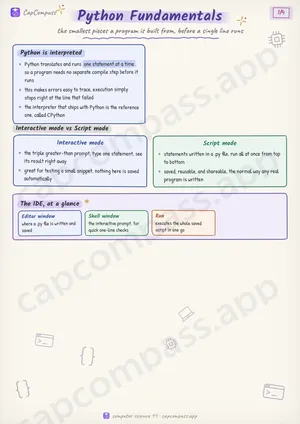
the smallest pieces a program is built from, before a single line runs
Python is interpreted
- Python translates and runs one statement at a time, so a program needs no separate compile step before it runs
- this makes errors easy to trace, execution simply stops right at the line that failed
- the interpreter that ships with Python is the reference one, called CPython
Interactive mode vs Script mode
- the triple greater-than prompt, type one statement, see its result right away
- great for testing a small snippet, nothing here is saved automatically
- statements written in a .py file, run all at once from top to bottom
- saved, reusable, and shareable, the normal way any real program is written
The IDE, at a glance
- Editor window: where a .py file is written and saved
- Shell window: the interactive prompt, for quick one-line checks
- Run: executes the whole saved script in one go
Page 1 of 4. The full sheet, all 4 pages, opens free in the app.
What this Python Fundamentals sheet covers
- Python is interpreted
- Interactive mode vs Script mode
- Interactive mode
- Script mode
- The IDE, at a glance
- Editor window
- Shell window
- Run
- Tokens, the smallest meaningful units
- Naming an identifier
- Variables, dynamically typed
- The core built-in types
- int
- float
- bool
- str
- complex
- NoneType
- Four of the six, one family
- type() reports these types
- type(5)
- type(5.0)
- type(True)
- type('hi')
- type(2+3j)
- type(None)
- 0.1 plus 0.2, the surprise floats hide
- Terms that show up as one-liners
- input() and casting
- print(), sep and end
- print(1, 2, 3)
- print(1, 2, sep='-')
- print('hi', end='!')
- Comments and indentation
- Traps that cost marks
- Tricks that save time
How CapCompass uses this sheet
These notes are not a standalone PDF. CapCompass plans Computer Science chapter by chapter against your real exam dates and free hours, and when the plan reaches Python Fundamentals the sheet opens inside the study block itself — at the page covering the sub-topic that block is on, with the timer still running. Revision arrives at the moment the plan says revise, instead of having to be gone looking for.