Packages — Class 11 ISC Computer Science revision notes
A 3-page visual revision sheet for Packages, written for Class 11 ISC Computer Science. Formulas, diagrams and the traps that cost marks, laid out to be read the night before rather than the term before. Free, and it opens inside CapCompass.
 Page 1 as PDF
Packages in one look
a namespace for classes, and the four levels of who else is allowed to see inside one
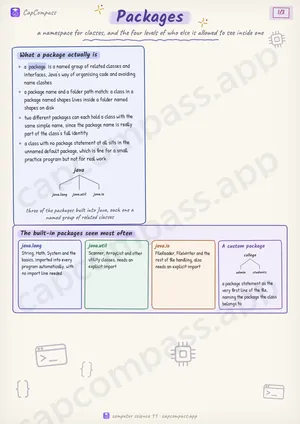
What a package actually is
- a package is a named group of related classes and interfaces, Java's way of organising code and avoiding name clashes
- a package name and a folder path match: a class in a package named shapes lives inside a folder named shapes on disk
- two different packages can each hold a class with the same simple name, since the package name is really part of the class's full identity
- a class with no package statement at all sits in the unnamed default package, which is fine for a small practice program but not for real work
The built-in packages seen most often
- java.lang: String, Math, System and the basics, imported into every program automatically, with no import line needed
- java.util: Scanner, ArrayList and other utility classes, needs an explicit import
- java.io: FileReader, FileWriter and the rest of file handling, also needs an explicit import
- A custom package: a package statement as the very first line of the file, naming the package the class belongs to
Page 1 of 3. The full sheet, all 3 pages, opens free in the app.
What this Packages sheet covers
- What a package actually is
- The built-in packages seen most often
- java.lang
- java.util
- java.io
- A custom package
- Bringing a package's classes in
- The four access levels
- The four in order, widest to narrowest
- public
- protected
- default
- private
- Choosing a modifier for a field
- Why the levels exist at all
- Traps that cost marks
- Tricks that save time
How CapCompass uses this sheet
These notes are not a standalone PDF. CapCompass plans Computer Science chapter by chapter against your real exam dates and free hours, and when the plan reaches Packages the sheet opens inside the study block itself — at the page covering the sub-topic that block is on, with the timer still running. Revision arrives at the moment the plan says revise, instead of having to be gone looking for.
More Computer Science Class 11 revision notes
- Arrays and Strings
- Basic Input Output and File Handling
- Encodings
- Implementation of Algorithms
- Introduction to Object Oriented Programming using Java
- Methods and Constructors
- Numbers
- Objects and Classes
- Primitive Values, Wrapper Classes and Types
- Propositional Logic and Hardware Implementation
- Recursion
- Statements and Scope
- Trends in Computing and Ethical Issues
- Variables and Expressions