Statements and Scope — Class 11 ISC Computer Science revision notes
A 4-page visual revision sheet for Statements and Scope, written for Class 11 ISC Computer Science. Formulas, diagrams and the traps that cost marks, laid out to be read the night before rather than the term before. Free, and it opens inside CapCompass.
 Page 1 as PDF
Statements and Scope in one look
what a line of Java actually is, and where a name it declares can be seen
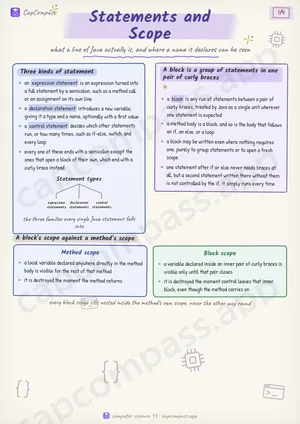
Three kinds of statement
- an expression statement is an expression turned into a full statement by a semicolon, such as a method call or an assignment on its own line
- a declaration statement introduces a new variable, giving it a type and a name, optionally with a first value
- a control statement decides which other statements run, or how many times, such as if-else, switch, and every loop
- every one of these ends with a semicolon except the ones that open a block of their own, which end with a curly brace instead
A block is a group of statements in one pair of curly braces
- a block is any run of statements between a pair of curly braces, treated by Java as a single unit wherever one statement is expected
- a method body is a block, and so is the body that follows an if, an else, or a loop
- a block may be written even where nothing requires one, purely to group statements or to open a fresh scope
- one statement after if or else never needs braces at all, but a second statement written there without them is not controlled by the if, it simply runs every time
A block's scope against a method's scope
- a local variable declared anywhere directly in the method body is visible for the rest of that method
- it is destroyed the moment the method returns
- a variable declared inside an inner pair of curly braces is visible only until that pair closes
- it is destroyed the moment control leaves that inner block, even though the method carries on
Page 1 of 4. The full sheet, all 4 pages, opens free in the app.
What this Statements and Scope sheet covers
- Three kinds of statement
- A block is a group of statements in one pair of curly braces
- A block's scope against a method's scope
- Method scope
- Block scope
- Entering and leaving nested blocks
- Shadowing, when an inner name hides an outer one
- if-else against switch-case
- How switch-case falls through
- Words the question will use
- Traps that cost marks
- Tricks that save time
How CapCompass uses this sheet
These notes are not a standalone PDF. CapCompass plans Computer Science chapter by chapter against your real exam dates and free hours, and when the plan reaches Statements and Scope the sheet opens inside the study block itself — at the page covering the sub-topic that block is on, with the timer still running. Revision arrives at the moment the plan says revise, instead of having to be gone looking for.
More Computer Science Class 11 revision notes
- Arrays and Strings
- Basic Input Output and File Handling
- Encodings
- Implementation of Algorithms
- Introduction to Object Oriented Programming using Java
- Methods and Constructors
- Numbers
- Objects and Classes
- Packages
- Primitive Values, Wrapper Classes and Types
- Propositional Logic and Hardware Implementation
- Recursion
- Trends in Computing and Ethical Issues
- Variables and Expressions